
Answers to the questions new Black Pearl Mail users ask most often.
🚀 How do I turn on my signature?
Ask your organization's Black Pearl Mail administrator to turn it on for you. If you're the admin, log in to Black Pearl Mail at https://admin.blackpearlmail.com, go to People, and switch on the signature setting for that person.
Does my signature work on every device?
Yes. Black Pearl Mail applies your signature whenever you send from the email address it's set up for, wherever you send from. That includes phones, tablets, email apps, and the web version of your email client.
Why can't I see my signature while I'm writing?
Black Pearl Mail adds your signature after you click send, so it stays under central control. You don't see it while you write, but your recipients do.
Do CC and BCC recipients see the branding?
Yes. Everyone on the email gets it with your Black Pearl Mail branding.
🔧 Why do my emails have two signatures?
Your email client still has its own signature turned on. Turn it off so only your Black Pearl Mail signature appears:
- Google Workspace or Gmail — How to remove your Gmail signature
- Microsoft 365 or Outlook — How to remove your Outlook signature
How do I change my template or signature details?
Ask your Black Pearl Mail administrator. If you're the admin, log in at https://admin.blackpearlmail.com.
Why isn't my branding showing when I email myself on an iPhone?
When you email yourself, your iPhone shows you the copy from your sent items, which isn't branded. Open the same email on another device and you'll see the branding.
My signature or branding isn't coming through right. What should I do?
Contact your Black Pearl Mail administrator.
What does an Insights notification email mean?
Insights, the Black Pearl Mail email analytics app, emails you when someone acts on your email, for example by opening it or clicking your banner. Your notification settings in Insights decide which notifications you get.
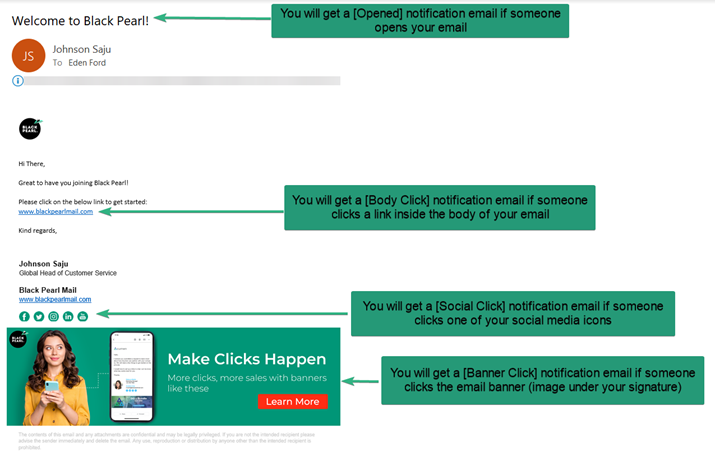
An example Insights notification.
To change them, see the Notifications overview.
Need help? Visit the Black Pearl Mail Help Centre or book a support session with the team.